Blog
If you’re choosing an uninterruptible power supply (UPS) for a commercial site, its load capacity only tells a small part of the story. To make the right selection, you also need to consider how the system will be maintained, expanded and operated throughout its service life.
Can it support your critical load?
Can you properly maintain it without any unnecessary disruption?
Can it scale with new equipment or capacity later?
The right solution depends on far more than kVA rating alone. Understanding how the UPS will be maintained, expanded and operated over its lifetime is often just as important. A monolithic UPS and a modular UPS can both protect critical systems, but one may work better depending on how your site really runs day to day.
For commercial UPS, the decision usually comes down to a combination of space, maintenance, demand, scale and cost. Whether you are specifying a single phase UPS or three phase UPS for a data centre, manufacturing facility or commercial building, understanding the differences between modular and monolithic architectures is an important part of developing an effective critical power protection strategy. In this blog, we’ll go over the most important considerations, helping you choose the best fit for your needs.
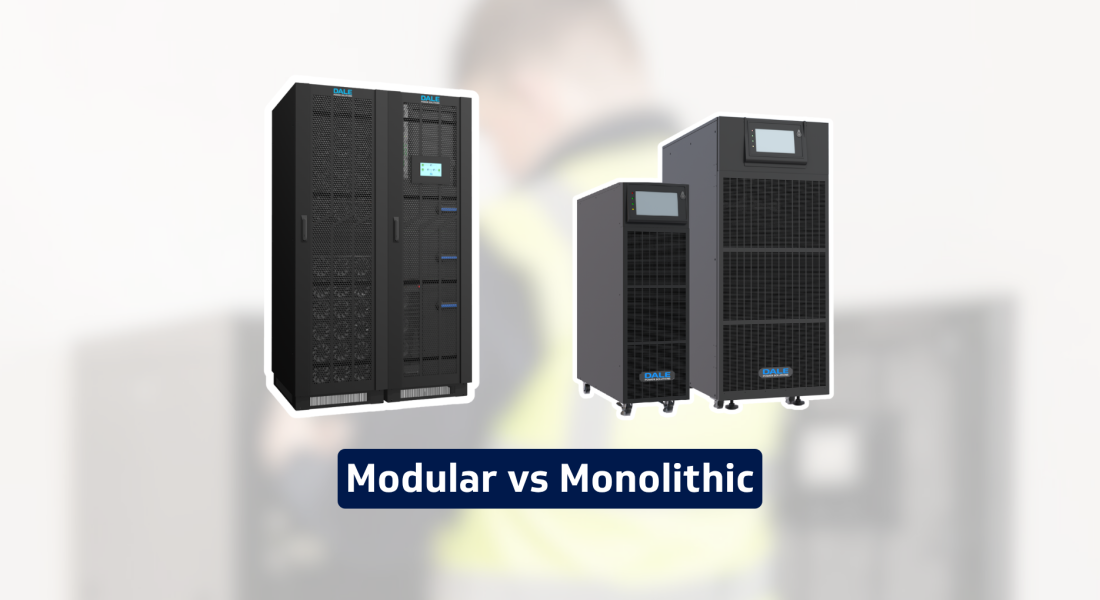
Modular and monolithic are two types of UPS solutions that differ in several key ways:
A monolithic UPS is a fixed-capacity unit. It’s sized around a known load and is often used where the power requirement is stable and future growth is limited.
A modular UPS uses a frame or cabinet fitted with individual power modules. Each module adds to the total system capacity, allowing the UPS to scale as your power requirements grow. Another significant advantage is that many modern modular UPS systems feature hot-swappable power modules, allowing a failed module to be replaced whilst the UPS remains online, reducing Mean Time to Repair (MTTR) and helping maintain maximum availability for critical loads.
If your site has a stable load profile and limited future expansion requirements, a monolithic UPS may be the most appropriate solution. But for a site where loads may change, or where downtime windows are limited, modular UPS can offer more flexibility.
The table below summarises some of the key differences between the two architectures.
Consideration | Monolithic UPS | Modular UPS |
Initial cost | Often lower | Often higher |
Scalability | More limited – expansion may require an additional UPS system or replacement unit | High – additional hot-swappable power modules can be added as requirements grow |
Maintenance | Typically requires more planning and may involve downtime during repairs or upgrades | Hot-swappable modules can often be replaced or maintained without interrupting the load |
Space efficiency | Depends on the power rating and configuration | Often provides higher power density and more efficient use of space |
Redundancy | Usually achieved through parallel UPS systems | Usually achieved through parallel UPS systems |
Future expansion | May require additional UPS units or system replacement | Additional modules can be installed within the existing frame, subject to available capacity |
With a modular UPS, some of the main advantages are that you can:
Add power modules as load grows
Built in N+1 redundancy where required
Reduce disruption during maintenance
Make better use of plant room space.
For sites where load requirements are expected to change over time, modular UPS can provide significant operational advantages. One of the key advantages of a modular UPS system is scalability. Rather than investing in a larger UPS than is currently required, organisations can add additional power modules as demand grows. This approach has made modular UPS systems particularly popular in data centre UPS applications, where future expansion and high availability are often key requirements.
In a recent project for a commercial and industrial client, we installed a 20kVA modular UPS system using two 10kVA modules within a 50kVA frame. This gave the site the capacity it needed today, while also leaving room for future expansion within the same frame. The project also included a new battery stand, showing how modular UPS supports both resilience and maintainability.
Despite the growth of modular UPS technology, monolithic UPS systems remain the preferred choice for many applications. A monolithic UPS may still be a good fit if:
Your load is stable
You have clear and modest growth plans in place
Your maintenance is already structured and manageable
Space isn’t a massive issue.
Monolithic UPS systems continue to be widely used in demanding industrial environments, including utilities, water treatment facilities, manufacturing plants, transport infrastructure and defence applications. Their robust design, proven reliability and ability to operate in harsh environments make them an excellent choice where long-term stability is the primary objective. These industrial UPS applications often prioritise robustness, fault tolerance and long-term reliability over scalability, making monolithic UPS systems a preferred choice for many infrastructure and process-critical environments.
Before choosing a system, you need to understand the load you’re protecting. It’s also important to consider the level of resilience required and how your site might change or scale up over time. This is why the modular design suits modern commercial UPS systems especially well.
In particular, think about these key questions:
Are you increasing how much load the UPS can support?
Are you improving how the UPS copes if a component becomes unavailable?
Are you doing both?
A modular UPS can often support both aims, but they’re not the same thing. If every module is needed to support the full load, you have capacity but not redundancy. If you have one or more extra modules beyond the required load, you have resilience built into the system.
As we’ve seen, N+1 redundancy is one of the most useful features of modular UPS. In this design, the N refers to the number of modules needed to support your critical load. The +1 is then an extra module that gives the system redundancy.
As an example, if your critical load is 200kW and each UPS module is rated at 50kW, you need four modules to support the load. However, if you install five modules (N+1), the fifth provides redundancy. If one fails or is under maintenance, the remaining four can still support the full load, allowing the failed module to be replaced while the remaining modules continue supporting the critical load, reducing operational risk and avoiding unnecessary downtime.
For manufacturing and engineering sites, this type of modular setup provides added resilience.
Looking at your whole site rather than the UPS in isolation can show you which type of UPS will best support your processes. The following checklist is a good way to get started.
First, identify which systems need UPS protection and which don’t. A production line, control system or monitoring platform may need a higher level of resilience than less critical services. Are any of your systems supporting life safety applications? If so, our range of UPS systems designed to comply with EN50171 should be considered.
N+1 may be useful where downtime risk is high. However, it’s not always necessary for every application. The right level depends on the cost and impact of interruption on a given service.
Are you planning to scale? If so, this is where modular UPS can be an excellent investment. Think about new machinery, automation upgrades, added production capacity or any other major planned changes. These can all affect the load profile.
A UPS should be practical enough to support throughout its life, not just suitable on day one. Thinking about things such as maintenance access, spares, module replacement and mean time to repair (MTTR) will help you keep UPS servicing practical.
Next, it’s important to remember that the backup duration you choose should be based on real operating needs. You may only need enough time to bridge until generator support, or you might need longer.
While monolithic UPS systems can often offer a lower initial capital cost, modular UPS systems may reduce future upgrade expenditure by allowing capacity to be added incrementally as business requirements grow. But this isn’t the be all and end all. Factors like energy efficiency, maintenance, downtime risk and future upgrades all affect the total lifetime cost of a system, so should be included in your checks.
Modern UPS systems offer excellent energy efficiency, helping to reduce operating costs over the lifetime of the installation. Transformerless UPS systems, including many modular designs, can achieve efficiencies above 96% in online double-conversion mode. Modular UPS systems may also maintain higher efficiency during periods of lower loading by placing unused power modules into standby or sleep mode.
When assessing lifetime costs, energy consumption should be considered alongside reliability, maintainability, redundancy requirements and future expansion plans. While transformerless UPS systems often deliver the highest operating efficiencies, transformer-based UPS systems continue to be selected for demanding industrial and infrastructure applications where electrical isolation, fault tolerance and long-term robustness are key design considerations.
When selecting a UPS, it is important to consider both the system architecture and the UPS topology. Most modern modular UPS systems utilise transformerless technology to maximise efficiency and scalability, whilst monolithic UPS systems are available in both transformerless and transformer-based designs depending on the application requirements.
Dale Power Solutions supplies both modular and monolithic UPS systems, including both single phase and three phase UPS solutions for commercial, industrial, infrastructure and data centre UPS applications. Our portfolio ranges from small commercial installations through to large-scale critical power protection projects supporting some of the UK's most demanding environments.
Our engineers work with consultants, contractors, facilities teams and end users to assess load requirements, autonomy, redundancy strategies, maintenance considerations and future expansion plans before recommending the most appropriate solution.
Is a modular UPS more reliable than a monolithic UPS?
Both modular and monolithic UPS systems can provide excellent reliability when correctly specified, installed and maintained. The main difference is that modular UPS systems can often achieve higher availability through built-in redundancy and hot-swappable modules, allowing maintenance or module replacement without interrupting the protected load.
Can a monolithic UPS be expanded in the future?
Yes, but expansion is typically more limited than with a modular UPS. Increasing capacity may require installing an additional UPS system, upgrading to a larger unit or implementing a parallel configuration. Modular UPS systems are generally designed to support easier expansion by adding power modules within the existing frame, subject to available capacity.
What is N+1 redundancy in a UPS system?
N+1 redundancy means installing one additional UPS module beyond the number required to support the critical load. For example, if four modules are needed to support the load (N), a fifth module (+1) provides redundancy. If one module fails or is removed for maintenance, the remaining modules can continue supporting the full load.
Which UPS architecture is best for commercial and industrial facilities?
The best choice depends on your site's requirements. Monolithic UPS systems are often well suited to applications with stable, predictable loads and limited future expansion plans. Modular UPS systems may be more appropriate where scalability, resilience, reduced maintenance disruption and future growth are key considerations. A site assessment can help determine the most suitable architecture for your specific operational needs.